3D Render Podium Mockup Background for Product Showcase
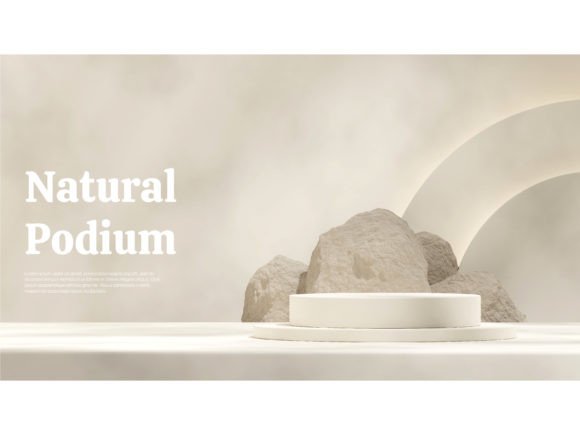
Imagine a product so striking it deserves its own stage, set against a backdrop that feels both modern and organic. That’s the exact feeling a 3D Render Podium Mockup Background delivers, offering designers a powerful tool to create instant visual impact. This specific asset features a 3d render empty mockup white cylinder podium nestled within a textured landscape rock background, presented in a dynamic semi-circle composition. It’s a design-ready scene waiting for your creative touch.
For designers working on branding, packaging, or social media visuals, a high-quality mockup like this is invaluable. It provides a realistic, professional context for presenting work without the need for complex 3D software or studio photography. The included PSD and JPG files ensure flexibility, while the editable text and well-organized layers make customization straightforward. This isn't just a background; it's a foundational design asset for creating polished presentations.
Creative Applications and Design Flexibility
The versatility of a 3D Render Podium Mockup Background extends across numerous projects. It’s particularly effective for:
- Brand Identity & Logo Design: Showcase a logo or brand mark in a clean, elevated environment that emphasizes detail and sophistication.
- Packaging & Product Design: Display product packaging, cosmetics, electronics, or artisanal goods on a pedestal that draws the eye, perfect for e-commerce listings or portfolio pieces.
- Poster & Editorial Design: Create striking hero images for articles, magazine covers, or event posters where the subject needs to command attention.
- Social Media & Web Graphics: Develop engaging visuals for Instagram, Facebook ads, or website banners that stand out in a crowded feed.
- Digital Products & Merchandise: Present digital downloads, app interfaces, or merchandise mockups with a tangible, high-end feel.
The semi-circle composition and natural rock texture offer a unique balance of modern minimalism and earthy warmth, making it suitable for both tech and lifestyle brands. The high resolution (8000 x 4500 pixels at 300 dpi) ensures crisp results even for large-format prints.
Pairing Typography for Maximum Impact
A mockup is only as good as the typography that accompanies it. This package thoughtfully includes two complementary Google Fonts: Calistoga and Archivo. Understanding how to use them is key to unlocking the mockup's full potential.
Calistoga is a display serif font with a friendly, slightly retro character. Its rounded terminals and bold presence make it excellent for headlines, logos, and branding elements that need a touch of personality and warmth. It’s a creative font that works well for short, impactful text where you want to convey approachability and style.
In contrast, Archivo is a clean, modern sans-serif font designed for clarity and versatility. It shines in body text, UI elements, and supporting copy where readability is paramount. This pairing follows a classic design principle: combine a distinctive display font with a neutral workhorse for balance.
When using this mockup, consider Calistoga for your main product name or headline on the podium, and Archivo for descriptions or details. This font pairing creates a visual hierarchy that is both attractive and functional, enhancing modern typography in your layout.
Tips for Choosing and Using Your Mockup
Before integrating this or any design asset into your workflow, a few practical checks can ensure success:
- Check Readability: Test your chosen fonts, especially at smaller sizes, against the background. The clean white podium and textured rock should provide good contrast.
- Match the Mood: The semi-circle and natural rock evoke a sense of curation and grounded elegance. Align your color palette and additional graphic elements to this mood for visual consistency.
- Test Font Pairings: While Calistoga and Archivo are included, experiment with other premium font combinations from your library to see what best suits your project's tone—be it a script font for luxury or a bold handwritten font for a casual vibe.
- Review the License: Always confirm the usage rights. Ensure the commercial font license and mockup license cover your intended use, whether for client work, merchandise, or digital products.
- Organize Your Files: The well-organized layers in the PSD file are there to save you time. Use them to isolate elements, adjust shadows, or modify the background seamlessly.
Investing in quality design assets like this mockup is an investment in your professional output. It streamlines your process, elevates your presentations, and helps build stronger brand recognition through consistent, high-caliber visuals. The right tools don't just make a design look good—they make the entire creative journey more efficient and rewarding.